My Mental Model for “Is It Worth Automating?” Has Changed
Disposable scripts suddenly make sense when the implementation cost collapses.
So, to set the backdrop: It's May 2026, and we're all talking about AI, all the time. Well, some of us, anyway. And there was an inflection point in the abilities of coding agents around January 2026, to the point where they are now good enough to be trusted with writing a lot of code. This could be good or bad, depending on your view, and maybe you shouldn't trust AI with your entire codebase yet.
Something I haven't seen discussed much is just how useful AI can be outside of your main codebase: we can let AI write code to automate things that previously would have had a terrible work-to-time ratios. Obligatory XKCD:
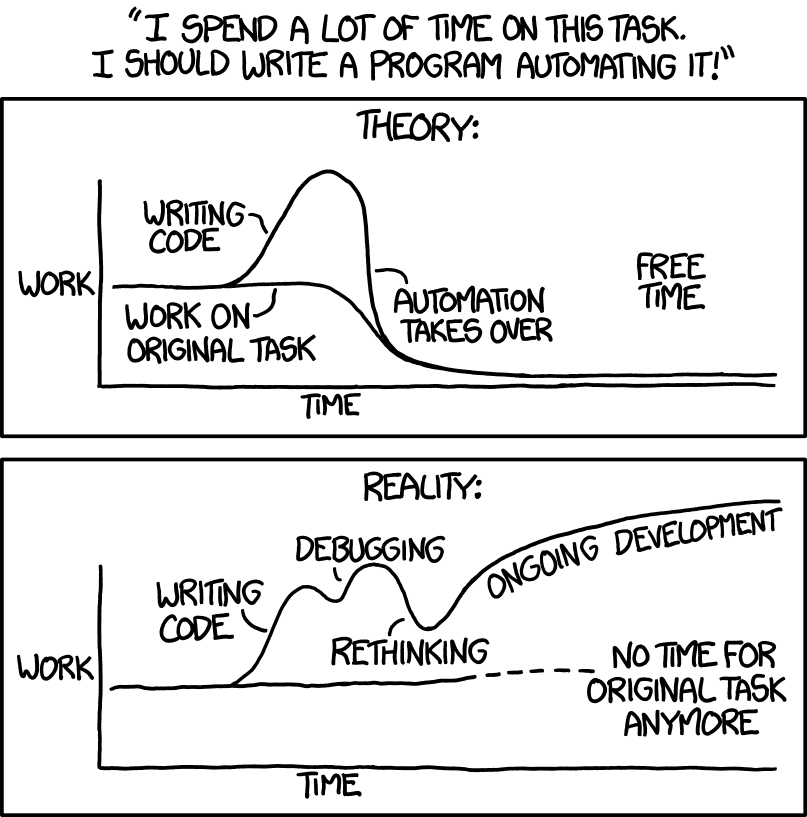
The above XKCD comic was from January 2014. Now, in 2026, the "reality" graph may very well look like the "theory" graph from before.
To illustrate, I'd like to highlight some examples from a game project I've been working on. There were many instances where I asked AI to create automation for problems where I previously would not even have considered automation at all.
Automation gone wild
During development of a solo dev game, Sky Lobby, I tasked AI with automating the following, among other things:
1. Bots to playtest the game, simulating different player styles and skill levels
Sky Lobby is a puzzle game that involves both strategy and reflexes. Before real playtesting started, I wanted to get a quick feel for how difficult every level was, without spending hours playing the full game myself (however fun that may have been... time is a solo developer's most precious resource!). So I asked AI to write a bot that played the game.
It was to implement and compare four strategies: passive, random, a sweep that brute-forces a floor-by-floor tour, and a heuristic that actually plays well. Each strategy ran repeatedly across multiple reflex tiers, generating win rates and engagement flags per level. As the bots play at a sped-up rate, it takes about three minutes to finish the simulations, and then I get a markdown report showing which levels are too easy (the simple strategies win), too hard (no strategies win), or too boring (long periods of not needing to do anything). This was useful for getting an initial baseline for all the levels, and it allowed me to fine-tune them before playing through them myself and later sending them to human players.
Cost to automate with AI: 15 minutes
Time saved: Days, either of manual testing, or developing similar bots
Previously I may also have written such bot playtesters, but it would have taken a few days, at which point it probably would have been faster and better to play the game through a couple of times.
In addition to the markdown file, I wanted to see how the bots played, to make sure they weren't getting stuck or doing something silly. So AI wrote a shell script that drives Godot headless with --write-movie, records each level, and concatenates them into one playthrough video. In addition to giving me further ideas for refining the game and bot behavior, this was great for getting a feel for what it is like to play the game from start to finish, condensed into a few minutes.
Cost to automate with AI: 5 minutes
Time saved: Hours, maybe days
Would I have done this at all, before? Probably not.
2. A script for syncing Game Center entries
Game Center provisioning means 11 leaderboards, 2 global achievements, and per-level 3-star achievements, each in 10 localizations with its own icon. The official tool is App Store Connect's web UI. I spent 10 minutes manually entering data until I thought, "I'm spending a lot of time on this task...". I asked AI to write code that hits the App Store Connect REST API directly, reads every localization from a CSV, and provisions it all idempotently. This is one of those things that I, as a solo dev working on a small project and only expecting to do this task once or twice, probably would not have automated before, but since it's so easy to automate now, it suddenly made sense and ended up saving me a lot of time.
Cost to automate with AI: 10 minutes
Time saved: 2-3 hours of manual entry, or 2-3 hours of writing a similar script by hand
3. Screenshots of the game for every iOS simulator
Early beta testers reported empty areas on the top and bottom of the screen that I had trouble reproducing on my own iPhone. I asked AI to write a script that takes screenshots of the game being played on every possible device. It came up with a bash script that picks from available simulators, installs the build, launches it with a --shoot-gameplay flag I added, waits six seconds, and grabs a screenshot per device via simctl. The whole sweep takes a couple of minutes.
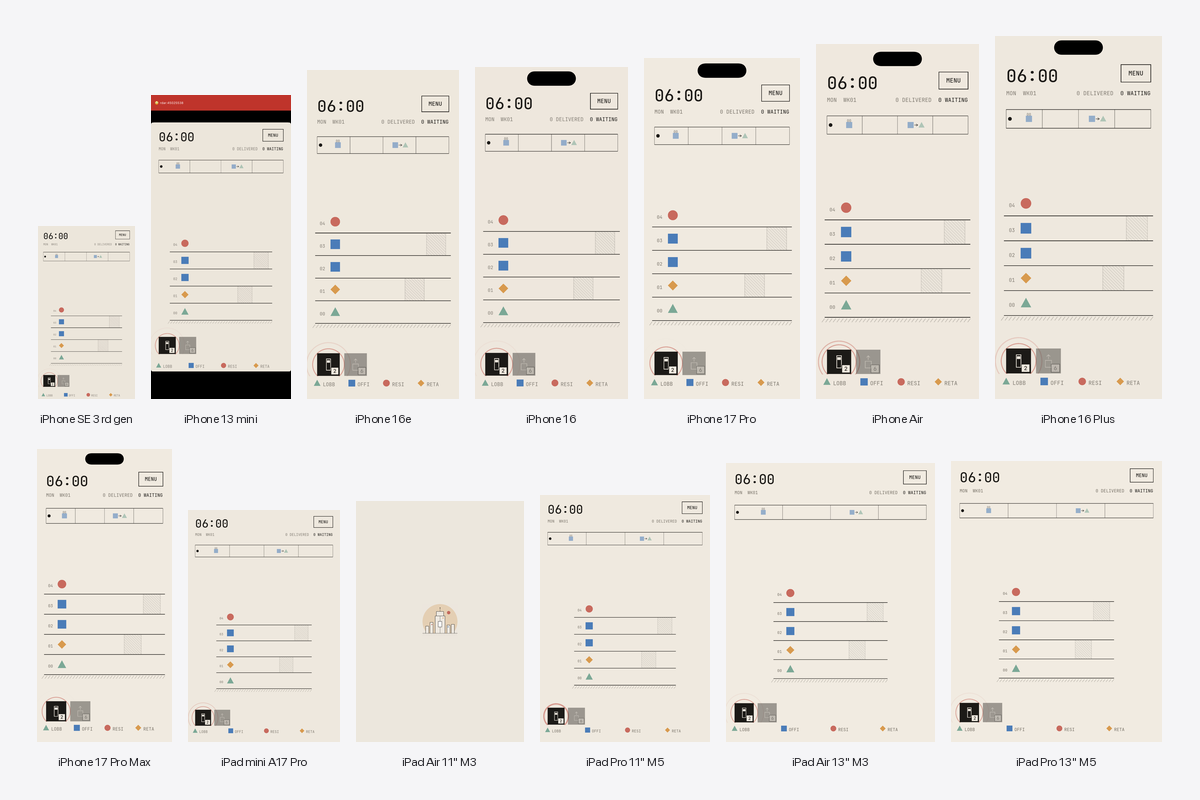
Cost to automate with AI: 10 minutes
Time saved: At least a few hours of me figuring out how to write such a script myself, or hours of me testing manually.
The quality of the game benefited from this AI-built automation, without AI changing any of the game code directly.
4. A promo video as code
Instead of editing a trailer in a video editor, the game promo is a GDScript file that drives a live tower simulation through a 17-second storyboard. Doors open, humans walk on, the tower builds, the camera follows, a title card lands. I had a vision of what I wanted the trailer to be like, I collected the assets I wanted to use for it, and I let AI program the specifics. It's not going to win any Oscars, but it worked, and allowed me to spend more time focusing on the game itself.
That said, this one did take a lot of iterations to get right. I went back to ask the AI to tweak it somewhere between 50 and 100 times before I was (more or less) satisfied with the result. Early on I tried editing the code myself, but it quickly became clear that this was not going to happen: the code was one 1,700-line ball of mud, relying on hundreds of inscrutable functions and constants.
Cost to automate with AI: A few hours, spread over a few days
Time saved: Hard to say. Maybe a few hours?
As an aside: one nice consequence of using Godot for this was that when I changed the cabs or added details to the buildings, the trailer automatically picked them up in the next render. It's always showing the current build. Which is how Godot's --write-movie is intended to be used, I guess, but it was new to me, and being able to let AI write the promo was much more successful than my earlier attempts at recreating the game's feel in external Lottie software.
What this means
Now, AI saved a lot of time here, and that's not so surprising. But the main thing I want to point out about these examples is that most of these are throw-away scripts; code that lives outside the main codebase. It doesn't really matter if it's poorly architected or not maintainable, as long as it does the job the one or two times I need it. This sidesteps one of the common objections against AI coding tools, which is that they are not (yet) able to build clean, well-architected systems. Plus, if AI didn't write these, probably no one would have, because it just didn't make sense before.
On the other hand
Still, some objections remain. And they are clearer when viewed through the lens of the examples we went through above. Here are a few:
- You miss out on learning opportunities. I now don't know how to automate iOS screenshots, or the intricacies of converting avi to mp4. I'm still not able to use Lottie animation software properly. I do have some AI-written examples to learn from if I did ever need to learn these skills, but they tend to be inscrutable. Which brings me to the next point,
- You become reliant on AI. When I tried to edit the code for the promo video, I simply... couldn't. Sure, given a few hours and maybe some questions to the agent about how it all works, I could've gotten there. But at the point it would probably have been better to write the code from scratch myself. With the sunk cost fallacy firmly forgotten, I kept prompting away for hours to get it to match my original vision. AI becomes the only lense through which you can understand the code.
- It doesn't consistently save time. In some of these examples, the time savings were obvious and immediate. In the promo video case, I'm not so sure. I guess what I take away from this is that, since it's quite easy and fast to try, it's worth asking the AI to see if it works, but when you get 5-6 prompts in and it's still not looking good, then perhaps it's time to suck it up and do it yourself.
Updating our mental models
The Automation XKCD comic was released in 2014, and it has, despite obvious exaggeration for humorous effect, been part of my mental model about what is worth automating and what is not ever since. The threshold for “worth automating” has collapsed, and this mental model now needs to be updated.
A script that once required half a day of context-switching, setup, and debugging can now often be produced in minutes. For the first time, the "Theory" part of the comic really does match reality (or can, at least).
An old, invisible category of software will now experience a quiet growth: disposable automation. Small, messy, highly specific tools that exist only to solve one problem and then quietly disappear. Historically, many of these tasks stayed manual because the overhead of writing the automation outweighed the benefit.
There's a parallel here with MCP servers and OpenClaw, where you let AI connect to services to perform mundane tasks for you. The small difference is that you're asking AI to write code, executing that code only once, or a few times, and then throwing it away. This may also be one of the safest and most effective uses of AI coding tools right now. Throw-away scripts do not need perfect architecture, long-term maintainability, or elegant abstractions. They just need to work well enough to save time.
About the game
Thanks for reading. If you're interested, the project mentioned in this post is a mobile game called Sky Lobby. You design and dispatch elevators in ever-growing skyscrapers. You need to place stops, build sky lobbies, and keep people moving as each tower becomes more crowded, more complex, and less forgiving. It's pretty fun, and I had a lot of fun developing it.